HOME » Page 2

Blog

  • The Annotated Office: Where Every Stapler is a Bounding Box

    The Annotated Office: Where Every Stapler is a Bounding Box


    Ever walk into your office and feel like you’re stepping into a meticulously labeled diagram? No? Well, welcome to “The Annotated Office,” where for some of us, every stapler isn’t just a stapler – it’s a ‘bounding box’, and your coffee mug? That’s definitely a ‘class: beverage_container’ with a ‘confidence score: 0.98’.

    Okay, perhaps we’re exaggerating… slightly. But for anyone immersed in the world of Artificial Intelligence, Machine Learning, and particularly Computer Vision, the concept of “annotation” seeps into every corner of perception, even the mundane office environment.

    What’s a Bounding Box Anyway?

    For the uninitiated, a bounding box is a fundamental concept in computer vision. Imagine you’re teaching a computer to identify objects in an image. You wouldn’t just point and say, “That’s a cat!” Instead, you’d draw a tight, rectangular box around the cat in hundreds, even thousands, of images. This box, along with the label “cat,” tells the AI exactly where the cat is and what it is.

    These painstakingly drawn boxes are the backbone of object detection models. They allow self-driving cars to spot pedestrians, medical imaging software to identify anomalies, and retail analytics to track product placement.

    The Office as Our Training Data

    So, how does this translate to your everyday office life?

    For those of us working with data annotation, our brains are constantly, perhaps subconsciously, performing a form of real-time object detection and classification.

    • The ‘Chair’ Bounding Box: You see a chair. Your brain doesn’t just register “chair.” It instantly understands its spatial dimensions, its separation from the wall, and its unique identity within the room. In an annotated world, that’s a perfect bounding box around ‘class: chair’.
    • The ‘Keyboard’ Confidence Score: As your fingers hover over the keyboard, you’re not questioning what it is. Your internal “confidence score” for ‘class: keyboard’ is sky-high, probably a solid 1.0. But what if a new, oddly shaped ergonomic keyboard appears? Your internal model might momentarily dip its score, then quickly recalibrate.
    • ‘Person’ Detection (aka Your Coworkers): Remember those moments when you glimpse a coworker just out of your peripheral vision? Your brain quickly processes the ‘bounding box’ of their form and assigns the ‘class: person’ label, often before you even consciously recognize them.
    • The ‘Clutter’ Anomaly: That overflowing desk that’s a nightmare of wires, empty coffee cups, and forgotten snacks? For a human, it’s just a messy desk. For an AI, it’s a nightmare of overlapping bounding boxes, low confidence scores, and perhaps a ‘class: clutter’ or ‘class: anomaly’ label waiting to be invented.

    Why This (Slightly Humorous) Perspective Matters

    While we don’t actually see bounding boxes floating around our colleagues, this playful perspective highlights a crucial point: the incredible complexity of human perception and the immense effort required to replicate even a fraction of it in artificial intelligence.

    Every time an AI successfully identifies an object, it’s built on a foundation of millions of these simple, yet powerful, annotations. It’s a testament to the meticulous, often unsung, work of data annotators who are quite literally teaching machines to see the world as we do.

    So, the next time you reach for that stapler, take a moment. Appreciate its simple, rectangular form. For in the world of AI, that humble office supply is a beautifully defined ‘bounding box’, a tiny piece of the puzzle that helps machines make sense of our complex visual world. And who knows, maybe one day your office will truly be “The Annotated Office,” meticulously mapped and understood by the intelligent systems of the future.



  • What is the future of manual prospect list building with so many automated AI tools around?

    What is the future of manual prospect list building with so many automated AI tools around?

    The future of manual prospect list building is not about being replaced by AI, but rather transformed and augmented by it. While AI tools are revolutionizing the efficiency and accuracy of lead generation, the “human touch” remains crucial for certain aspects of the sales process.

    Here’s a breakdown of how manual prospect list building is evolving:

    The Diminishing Role of Purely Manual, Repetitive Tasks:

    • Data Collection & Enrichment: AI tools excel at scraping vast amounts of data from various sources (websites, social media, databases), filtering it, and enriching contact details with verified information. This dramatically reduces the hours sales reps traditionally spent manually researching company details, job titles, email addresses, and phone numbers.
    • Lead Identification & Qualification: AI can analyze historical sales data, buying patterns, intent signals (like website visits, content downloads, specific keywords used in searches), and firmographics (company size, industry, location) to identify and score leads with high conversion potential. This automates a significant portion of the initial qualification process that was once highly manual.
    • Initial Outreach & Follow-ups: AI can draft personalized email templates, suggest optimal messaging, and automate follow-up sequences. While a human still reviews and refines, the heavy lifting of generating initial communications is automated.

    The Enduring (and Enhanced) Importance of the Human Touch:

    • Strategic Direction & Ideal Customer Profile (ICP) Definition: AI is only as good as the data and instructions it’s given. Humans are essential for defining the Ideal Customer Profile (ICP), understanding market nuances, and setting the strategic direction for AI-powered prospecting. Without a clear ICP, AI will generate off-target lists.
    • Nuanced Personalization & Emotional Intelligence: While AI can personalize at scale based on data, it struggles with genuine empathy, understanding subtle cues (like tone of voice in a call), and building deep, trust-based relationships. Complex sales, especially B2B, heavily rely on human interaction to forge connections, address complex objections, and build rapport. Sales reps are needed to fine-tune AI-generated messages to ensure they resonate emotionally and genuinely with the prospect.
    • Problem Solving & Creativity: AI can’t generate truly novel solutions or creative approaches to unique prospect challenges. Human sales professionals are crucial for adapting strategies, brainstorming solutions, and thinking outside the box when dealing with complex client needs.
    • Relationship Nurturing & Closing Deals: AI can identify high-intent prospects and automate initial engagement, but ultimately, building trust, nurturing relationships over time, and skillfully navigating negotiations to close deals still requires human sales talent.
    • Oversight and Refinement: AI models need continuous monitoring and feedback. Human oversight is necessary to ensure data quality, prevent algorithmic biases, and refine AI’s output based on real-world interactions and results. This “human-in-the-loop” approach optimizes the AI’s effectiveness.
    • Ethical Considerations & Compliance: Humans are responsible for ensuring that AI-driven prospecting adheres to data privacy regulations (like GDPR) and ethical guidelines.

    In conclusion, the future isn’t about eliminating manual prospect list building entirely, but rather about a powerful synergy between humans and AI:

    • AI handles the “heavy lifting”: data collection, initial qualification, large-scale personalization, and automation of repetitive tasks.
    • Humans focus on the “high-value activities”: strategic planning, building genuine relationships, complex problem-solving, nuanced communication, and closing deals.

    This hybrid approach allows sales teams to be far more efficient, accurate, and scalable than ever before, while still retaining the critical human element that drives conversion and customer loyalty. Manual prospecting transforms into a more strategic and less tedious activity, leveraging AI for maximum impact.

  • What is the future of manual prospect list building?

    What is the future of manual prospect list building?

    The future of manual prospect list building is not about being replaced by AI, but rather transformed and augmented by it. While AI tools are revolutionizing the efficiency and accuracy of lead generation, the “human touch” remains crucial for certain aspects of the sales process.

    Here’s a breakdown of how manual prospect list building is evolving:

    The Diminishing Role of Purely Manual, Repetitive Tasks:

    • Data Collection & Enrichment: AI tools excel at scraping vast amounts of data from various sources (websites, social media, databases), filtering it, and enriching contact details with verified information. This dramatically reduces the hours sales reps traditionally spent manually researching company details, job titles, email addresses, and phone numbers.
    • Lead Identification & Qualification: AI can analyze historical sales data, buying patterns, intent signals (like website visits, content downloads, specific keywords used in searches), and firmographics (company size, industry, location) to identify and score leads with high conversion potential. This automates a significant portion of the initial qualification process that was once highly manual.
    • Initial Outreach & Follow-ups: AI can draft personalized email templates, suggest optimal messaging, and automate follow-up sequences. While a human still reviews and refines, the heavy lifting of generating initial communications is automated.

    The Enduring (and Enhanced) Importance of the Human Touch:

    • Strategic Direction & Ideal Customer Profile (ICP) Definition: AI is only as good as the data and instructions it’s given. Humans are essential for defining the Ideal Customer Profile (ICP), understanding market nuances, and setting the strategic direction for AI-powered prospecting. Without a clear ICP, AI will generate off-target lists.
    • Nuanced Personalization & Emotional Intelligence: While AI can personalize at scale based on data, it struggles with genuine empathy, understanding subtle cues (like tone of voice in a call), and building deep, trust-based relationships. Complex sales, especially B2B, heavily rely on human interaction to forge connections, address complex objections, and build rapport. Sales reps are needed to fine-tune AI-generated messages to ensure they resonate emotionally and genuinely with the prospect.
    • Problem Solving & Creativity: AI can’t generate truly novel solutions or creative approaches to unique prospect challenges. Human sales professionals are crucial for adapting strategies, brainstorming solutions, and thinking outside the box when dealing with complex client needs.
    • Relationship Nurturing & Closing Deals: AI can identify high-intent prospects and automate initial engagement, but ultimately, building trust, nurturing relationships over time, and skillfully navigating negotiations to close deals still requires human sales talent.
    • Oversight and Refinement: AI models need continuous monitoring and feedback. Human oversight is necessary to ensure data quality, prevent algorithmic biases, and refine AI’s output based on real-world interactions and results. This “human-in-the-loop” approach optimizes the AI’s effectiveness.
    • Ethical Considerations & Compliance: Humans are responsible for ensuring that AI-driven prospecting adheres to data privacy regulations (like GDPR) and ethical guidelines.

    In conclusion, the future isn’t about eliminating manual prospect list building entirely, but rather about a powerful synergy between humans and AI:

    • AI handles the “heavy lifting”: data collection, initial qualification, large-scale personalization, and automation of repetitive tasks.
    • Humans focus on the “high-value activities”: strategic planning, building genuine relationships, complex problem-solving, nuanced communication, and closing deals.

    This hybrid approach allows sales teams to be far more efficient, accurate, and scalable than ever before, while still retaining the critical human element that drives conversion and customer loyalty. Manual prospecting transforms into a more strategic and less tedious activity, leveraging AI for maximum impact.

  • Email Marketing Tips

    Email Marketing Tips

    Email marketing remains a powerful tool for businesses to connect with their audience. Here are some effective email marketing tips:

    1. Build a Quality Email List (Organically):

    • Opt-in Forms: Use clear and prominent opt-in forms on your website, blog, and social media.
    • Lead Magnets: Offer valuable incentives like e-books, webinars, discount codes, or exclusive content in exchange for email addresses.

    2. Segment Your Audience:

    • Demographics: Segment by age, location, gender, etc.
    • Purchase History: Target customers based on what they’ve bought before.
    • Engagement Level: Send different content to highly engaged subscribers vs. those who haven’t opened emails recently.
    • Interests: Allow subscribers to choose the types of content they want to receive.
    • Benefits: Segmentation allows for more personalized and relevant content, leading to higher open rates and conversions.

    3. Personalize Your Emails:

    • Use Names: Address subscribers by their first name (if you have it).
    • Dynamic Content: Tailor content blocks within the email based on subscriber data (e.g., recommended products based on past purchases).
    • Behavioral Triggers: Send automated emails based on actions like abandoned carts, Browse specific products, or reaching a milestone.

    4. Craft Compelling Subject Lines:

    • Keep it Concise: Aim for 40-50 characters or 7-9 words, as many inboxes cut off longer lines.
    • Create Urgency/Curiosity: “Limited-time offer!” “A secret we can’t keep…”
    • Personalize: Include the recipient’s name or a relevant detail.
    • Use Emojis (Sparingly): Can stand out, but don’t overdo it.
    • A/B Test: Experiment with different subject lines to see what performs best.

    5. Focus on Valuable Content:

    • Provide Solutions: Address your audience’s pain points.
    • Educate: Share tips, tutorials, industry insights.
    • Entertain: Use storytelling, humor (if appropriate for your brand).
    • Promote Sparingly: Don’t just sell, sell, sell. Build relationships first.
    • Call to Action (CTA): Make your CTA clear, concise, and prominent. Use action-oriented language (e.g., “Shop Now,” “Learn More,” “Download Your Free Guide”).

    6. Optimize for Mobile:

    • Responsive Design: Ensure your emails look good and are easy to read on all devices (phones, tablets, desktops).
    • Single-Column Layouts: Often work best for mobile.
    • Large, Tappable Buttons: Make it easy for users to click your CTAs.
    • Concise Copy: Mobile users have shorter attention spans.

    7. Test and Analyze:

    • A/B Testing: Test different elements like subject lines, CTAs, email copy, images, and send times.
    • Key Metrics: Track open rates, click-through rates (CTR), conversion rates, bounce rates, and unsubscribe rates.
    • Analyze Data: Use insights from your data to refine your strategy and improve future campaigns.

    8. Automate Where Possible:

    • Welcome Series: Automatically send a series of emails to new subscribers.
    • Abandoned Cart Emails: Remind customers about items left in their cart.
    • Re-engagement Campaigns: Target inactive subscribers to bring them back.
    • Birthday/Anniversary Emails: Send personalized greetings with special offers.

    9. Maintain a Clean List:

    • Regularly Remove Inactive Subscribers: Subscribers who haven’t opened emails in a long time can hurt your sender reputation.
    • Process Unsubscribes Promptly: Make it easy for people to unsubscribe, and honor their requests immediately.
    • Monitor Bounce Rates: High bounce rates indicate issues with your list or email deliverability.

    10. Ensure Deliverability and Compliance:

    • Authenticate Your Emails: Use SPF, DKIM, and DMARC to prove your emails are legitimate.
    • Avoid Spam Triggers: Don’t use excessive capitalization, exclamation points, or spammy phrases.
    • Comply with Regulations: Adhere to laws like GDPR (Europe) and CAN-SPAM (US) regarding email marketing. This includes providing an easy unsubscribe option and including your physical address.

    By implementing these tips, you can create more effective email marketing campaigns that resonate with your audience and drive better results for your business.

  • What are the downsides of using AI in Email Marketing?

    What are the downsides of using AI in Email Marketing?

    While AI offers numerous benefits for email marketing, such as enhanced personalization and automation, it also comes with several downsides that marketers need to be aware of:1

    1. Lack of Authenticity and Empathy (Dehumanization):2

    • Robotic Tone: AI-generated content can sometimes sound generic, flat, or overly formal, lacking the human touch, emotional nuance, and creativity that builds genuine connections with subscribers.3
    • Inability to Handle Complex Situations: AI struggles with understanding subtle cues, complex emotions, or unique, sensitive customer issues, leading to inappropriate or unhelpful responses.4
    • Loss of Brand Voice: Over-reliance on AI can lead to homogenized content, making it difficult for a brand to maintain a distinct and authentic voice that resonates with its audience.5

    2. Data Privacy and Security Concerns:

    • Vast Data Collection: AI systems thrive on large datasets, which often include sensitive customer information.6 This raises concerns about how this data is collected, stored, processed, and protected.7
    • Unauthorized Data Use: There’s a risk of data being used for purposes beyond what customers consented to, or even being exposed through cyberattacks.8
    • Compliance Challenges: Ensuring compliance with data protection regulations like GDPR and CCPA becomes more complex when AI is involved, especially regarding data retention and the right to erasure.9
    • Lack of Transparency in Data Usage: Customers might not be fully aware of how their data is being used by AI, leading to a feeling of being “tracked” or manipulated.

    3. Algorithmic Bias:

    • Reinforcing Prejudices: AI models are trained on historical data, and if that data contains societal biases (e.g., related to race, gender, socioeconomic status), the AI can perpetuate and even amplify these biases in targeting, content recommendations, or pricing.10
    • Exclusion of Segments: Biased algorithms can inadvertently exclude or misrepresent certain customer groups, leading to unfair treatment and missed marketing opportunities.11
    • Misleading Information: AI can present outdated or inaccurate facts with confidence, potentially misinforming recipients if not carefully vetted by a human.12

    4. Over-Reliance and Loss of Human Oversight:

    • Reduced Creativity and Intuition: Marketers might become overly dependent on AI for content generation and strategy, stifling human creativity, intuition, and the ability to innovate beyond existing patterns.13
    • Errors and Misinterpretations: While efficient, AI isn’t foolproof.14 It can make mistakes or misinterpret data, leading to irrelevant messages, incorrect product recommendations, or misaligned calls to action (CTAs) without human review.15
    • Difficulty with Nuance: AI may struggle to pick up on the subtle emotional and contextual cues that a human marketer would notice, leading to less effective or even damaging communication.16

    5. Implementation Costs and Challenges:

    • Initial Investment: Implementing advanced AI tools and systems can be expensive, requiring significant investment in software, hardware, and skilled personnel.17
    • System Unification: Integrating AI tools with existing marketing platforms can be challenging if systems aren’t designed to work together seamlessly, limiting holistic data analysis.
    • Training Needs: Effective use of AI requires employees to be properly trained to handle these new technologies and oversee their output.18

    In summary, while AI offers powerful capabilities for email marketing, it’s crucial for businesses to use it responsibly and in conjunction with human oversight.19 Addressing issues like authenticity, data privacy, bias, and over-reliance is key to leveraging AI’s benefits while mitigating its potential drawbacks.

  • My Inbox is a Warzone: A Hilarious Guide to Surviving the Daily Email Onslaught

    My Inbox is a Warzone: A Hilarious Guide to Surviving the Daily Email Onslaught

    Good morning, brave warrior. Did you wake up to the sound of birds chirping? Or was it the relentless ping of your inbox, signaling the start of another day in the digital trenches? If you answered the latter, congratulations, you’re one of us. You’re a veteran of the Great Email War, and your inbox? That’s your personal, perpetually chaotic Warzone.

    Forget Call of Duty; the real action is happening right now, in that little icon on your desktop. Every day, a new wave of combatants descends, each vying for your attention, your clicks, and occasionally, your sanity. Let’s identify the enemy, shall we?

    The Combatants: A Rogues’ Gallery of Your Inbox

    • The Aggressive Sales Email (aka The Grenade Launcher): BOOM! “LAST CHANCE! 70% OFF! DON’T MISS OUT!” These emails are loud, often in all caps, and designed to create immediate panic. They don’t care if you just bought something similar yesterday; they’re here to make you question every financial decision you’ve ever made.
    • The Passive-Aggressive Reminder (aka The Sniper): “Just following up on…” “Circling back to…” These emails are deceptively polite, but their aim is true. They’ve been watching, waiting, and now they’re here to remind you about that thing you “forgot” to do. You can almost hear the sigh through the screen.
    • The Overly Enthusiastic Newsletter (aka The Human Shield): They mean well, bless their cotton socks. Packed with “exciting updates,” “curated content,” and enough GIFs to crash a small nation’s internet, these emails are so jam-packed they practically form a defensive wall against anything actually important. You scroll, you skim, you wonder if you ever actually signed up for this.
    • The “Urgent” Internal Memo (aka The General’s Orders): “ACTION REQUIRED BY EOD!” The subject line alone can trigger a fight-or-flight response. These emails demand immediate attention, often for something that could have been a quick Slack message or, dare I say, a conversation.
    • The Social Media Notification (aka The Distraction Drone): [Your Name] was tagged in a photo! [Someone you vaguely know] liked your post! Just when you’re trying to focus, these little digital gnats buzz in, luring you away from your mission with the promise of fleeting validation.
    • The Spam Bot (aka The Rogue Agent): “You’ve won a free trip to Mars! Just click here for your personal rocket launch codes!” We all know them. We all delete them. Yet, they persist, like digital cockroaches, always finding a way into your sacred space.

    Survival Tips for the Weary Warrior

    So, how do we survive this daily onslaught without succumbing to the dreaded “Inbox Zero” delusion (a myth, I tell you!) or, worse, email burnout?

    1. Prioritize Your Battles: Not every email is a five-alarm fire. Learn to triage. The “Urgent” internal memo? Probably needs your attention. The “LAST CHANCE!” sales email? Can wait until you’re feeling financially reckless (or never).
    2. The Art of the Quick Delete (The Silent Kill): Don’t open, don’t ponder, just delete. If it’s clearly spam, a newsletter you never read, or a sales pitch for something you’d never buy, execute the silent kill. Your “Deleted Items” folder is your graveyard of digital foes.
    3. Embrace the Unsubscribe Button (Your Digital Self-Defense): This isn’t surrender; it’s strategic retreat. If a newsletter consistently brings you more dread than delight, hit that unsubscribe button with the force of a thousand suns. You’re not losing; you’re gaining precious inbox real estate.
    4. Schedule Your Skirmishes: Don’t let your inbox dictate your day. Set specific times for checking emails. Treat it like a scheduled patrol. Outside of those times, close the tab. The world (and your inbox) will still be there.
    5. The “Respond Later” Grenade (for the Overwhelmed): Sometimes, the best defense is to acknowledge receipt and buy yourself time. A quick, “Got it, will get back to you by [time/date]” can defuse a potentially overwhelming situation.
    6. Find Your Foxhole (The Focused Work Block): Create periods of uninterrupted work where your email is closed, notifications are off, and you can actually think. This is your safe zone, your sanctuary from the digital noise.

    Your inbox may be a warzone, but you, my friend, are a seasoned survivor. With a little humor, a lot of strategic deleting, and a healthy dose of self-preservation, you can navigate the daily email onslaught and emerge (mostly) victorious. Now, if you’ll excuse me, I think I just heard the ping of another “urgent” memo… wish me luck.

  • The Enduring Power of the Inbox: A Summary of Email Marketing

    The Enduring Power of the Inbox: A Summary of Email Marketing

    The Enduring Power of the Inbox: A Summary of Email Marketing

    In a world saturated with fleeting social media trends and ever-changing algorithms, one marketing channel consistently proves its worth: email. Far from being an outdated relic, email marketing remains a cornerstone of successful digital strategies, offering a direct, personal, and highly effective way to connect with your audience.

    So, what exactly is email marketing, and why does it continue to reign supreme? Let’s dive into a comprehensive summary.

    What is Email Marketing?

    At its core, email marketing involves sending commercial messages to a group of people via email. However, it’s much more than just sending out promotional flyers. Effective email marketing is about building relationships, nurturing leads, and driving conversions through targeted, valuable, and timely communication. It encompasses everything from newsletters and promotional offers to transactional emails and personalized updates.

    Why is Email Marketing So Effective?

    The enduring power of email marketing lies in several key advantages:

    • Direct Communication: Unlike social media, where your message can get lost in the noise, email delivers your message directly to an individual’s inbox. This creates a personal connection and ensures higher visibility.
    • High Return on Investment (ROI): Email marketing consistently boasts one of the highest ROIs of all marketing channels. For every dollar spent, businesses can see significant returns, making it an incredibly cost-effective strategy.
    • Audience Segmentation and Personalization: Modern email marketing platforms allow for deep audience segmentation. You can divide your subscriber list based on demographics, interests, past purchases, and behavior, enabling you to send highly personalized content that resonates with specific groups.
    • Measurable Results: Almost every aspect of an email campaign can be tracked and analyzed. Open rates, click-through rates, conversion rates, bounce rates – these metrics provide valuable insights into campaign performance, allowing for continuous optimization.
    • Relationship Building: Beyond sales, email is a powerful tool for nurturing leads and building customer loyalty. Regular, valuable content can keep your brand top-of-mind, establish you as an expert, and foster trust.
    • Scalability: Whether you have ten subscribers or ten million, email marketing can scale with your business. Automation tools make it possible to manage large lists and complex campaigns efficiently.
    • Ownership of Your Audience: Unlike social media platforms where you’re at the mercy of algorithm changes, your email list is an asset you own. You have direct access to your audience without intermediaries.

    Key Components of a Successful Email Marketing Strategy:

    • List Building: The foundation of any email marketing effort is a strong, engaged subscriber list. This involves using opt-in forms, lead magnets (e.g., e-books, webinars), and strategic calls to action on your website and other platforms.
    • Email Service Provider (ESP): An ESP (e.g., Mailchimp, Constant Contact, Sendinblue) is essential for managing your subscriber list, designing emails, sending campaigns, and tracking performance.
    • Content Strategy: What will you send? This includes planning your email types (newsletters, promotions, abandoned cart reminders, welcome sequences) and the value you’ll provide in each.
    • Segmentation: Dividing your list into smaller, more targeted groups based on various criteria to send relevant content.
    • Personalization: Using subscriber data to tailor email content, subject lines, and offers to individual preferences.
    • Automation: Setting up automated email sequences (e.g., welcome series, post-purchase follow-ups) that trigger based on specific user actions.
    • A/B Testing: Experimenting with different subject lines, call-to-action buttons, email layouts, and content to optimize performance.
    • Analytics and Optimization: Regularly monitoring key metrics and using the insights to refine your strategy and improve future campaigns.
    • Compliance (GDPR, CAN-SPAM, etc.): Adhering to legal regulations regarding email marketing to ensure ethical practices and avoid penalties.

    Types of Emails You Can Send:

    • Welcome Emails: Sent immediately after someone subscribes, introducing your brand.
    • Newsletters: Regular updates, content, and news from your business.
    • Promotional Emails: Announcing sales, new products, or special offers.
    • Transactional Emails: Order confirmations, shipping updates, password resets.
    • Abandoned Cart Emails: Reminders to customers who left items in their online shopping cart.
    • Re-engagement Emails: Aimed at inactive subscribers to bring them back.
    • Educational/Nurturing Emails: Providing valuable information to guide leads through the sales funnel.

    The Future of Email Marketing:

    Email marketing is not static; it continues to evolve. We’re seeing greater emphasis on hyper-personalization, interactive emails, AI-powered content generation, and sophisticated automation that creates highly tailored customer journeys. Yet, the core principle remains the same: delivering value directly to the inbox to build lasting relationships.

    Conclusion:

    In a noisy digital landscape, email marketing offers a quiet, powerful sanctuary for direct communication. It’s a versatile, cost-effective, and highly measurable channel that, when executed strategically, can significantly contribute to business growth and foster deep, loyal connections with your audience. If you’re not fully leveraging the power of email marketing, now is the time to unlock its full potential.

  • The Unsung Heroes of AI: Why Data Annotators Are the Real MVPs

    The Unsung Heroes of AI: Why Data Annotators Are the Real MVPs

    The Unsung Heroes of AI: Why Data Annotators Are the Real MVPs

    In the glittering pantheon of Artificial Intelligence, we often hear about the visionary researchers, the ingenious algorithm developers, and the powerful hardware engineers. Their contributions are undeniable, shaping the very fabric of our technological future. However, there’s a vital group whose tireless efforts often go unrecognized, yet without whom the AI revolution would grind to a halt: the data annotators.1 These individuals are the unsung heroes, the meticulous artisans who transform raw, unorganized information into the structured, labeled datasets that are the lifeblood of machine learning.2 They are, unequivocally, the Real MVPs of AI.

    At its core, most modern AI, particularly in fields like computer vision, natural language processing, and speech recognition, relies on vast quantities of high-quality, labeled data for training.3 Imagine trying to teach a child to identify a cat without ever showing them one and saying, “That’s a cat.” It’s impossible. Similarly, AI models learn by being fed countless examples of data, each meticulously tagged with its corresponding meaning.4 This is precisely where data annotators step in.

    The Indispensable Role of Data Annotators:

    • The Foundation of Supervised Learning: The vast majority of AI applications today are built using supervised learning, a paradigm where models learn from labeled examples. Whether it’s drawing bounding boxes around objects in an image, transcribing audio, categorizing text, or segmenting medical scans, annotators provide the ground truth that enables algorithms to learn patterns and make predictions.5 Without their work, supervised learning simply wouldn’t exist.
    • Ensuring Accuracy and Quality: Garbage in, garbage out. No matter how sophisticated an algorithm, if the data it’s trained on is inaccurate, inconsistent, or poorly labeled, the AI’s performance will suffer dramatically.6 Data annotators are the frontline quality control, meticulously ensuring that each data point is correctly identified and tagged according to strict guidelines.7 Their precision directly translates to the accuracy and reliability of the final AI model.8
    • Handling the Nuances of Reality: The real world is messy and ambiguous. A simple object can appear in countless variations, lighting conditions, and orientations. Human annotators possess the cognitive ability to interpret these nuances, distinguish subtle differences, and apply common-sense reasoning that machines currently lack.9 They can understand context, identify partially obscured objects, or interpret sarcasm in text—tasks that still pose significant challenges for even the most advanced AI.10
    • Adapting to Evolving Needs: As AI projects evolve, so do their data requirements.11 New classes might be introduced, existing definitions refined, or specific edge cases highlighted. Data annotators are adaptable, learning new guidelines quickly and consistently applying them across massive datasets.12 This flexibility is crucial for the iterative development process of AI.13
    • Addressing Bias and Fairness: Data annotation isn’t just about technical accuracy; it also plays a critical role in mitigating bias.14 Thoughtful annotation practices, guided by diverse perspectives, can help ensure that datasets are representative and do not perpetuate or amplify existing societal biases.15 Annotators, often coming from diverse backgrounds themselves, are key to building more equitable AI systems.16

    More Than Just “Labeling”:

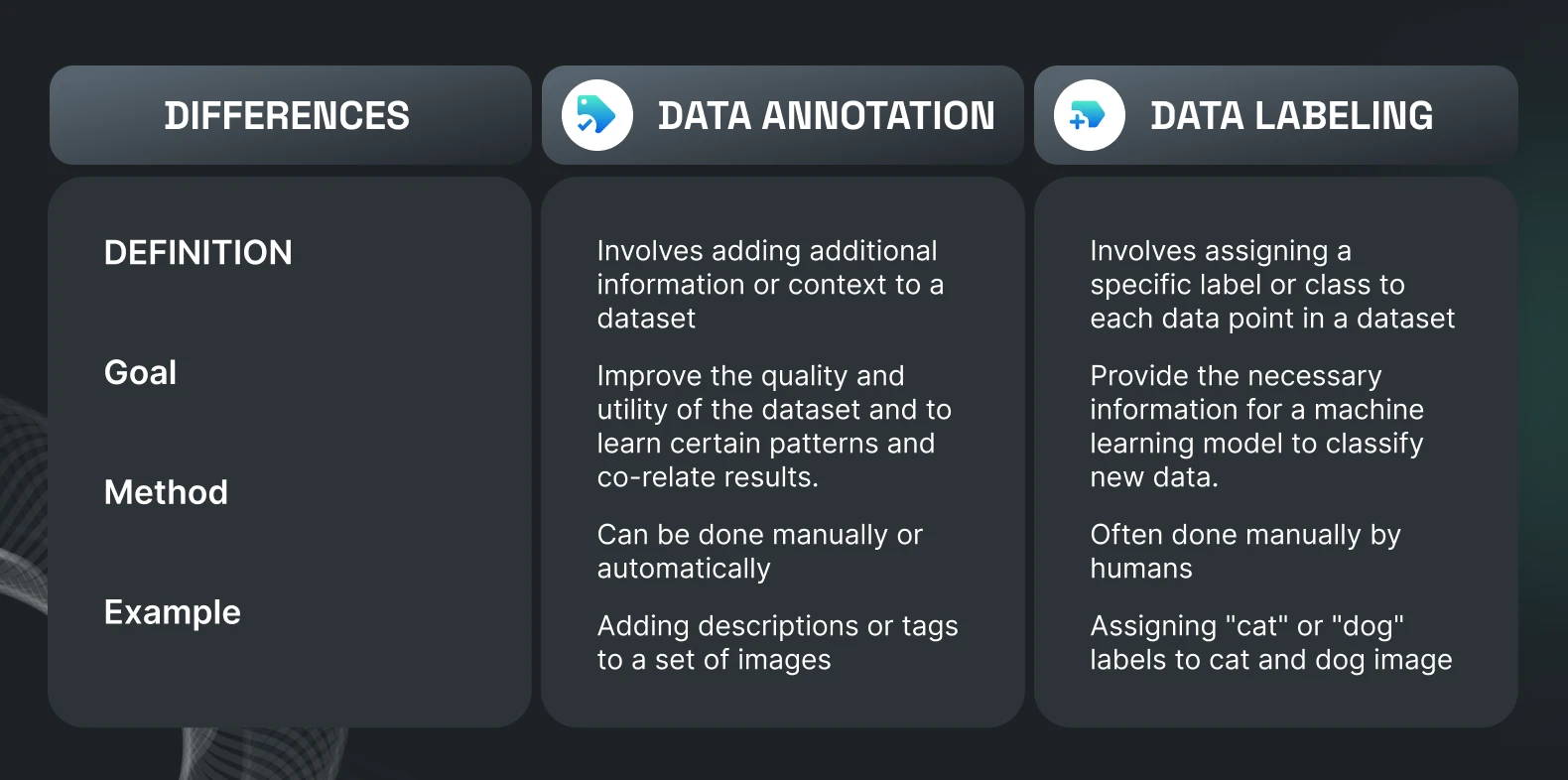
    The term “data labeling” often sounds simplistic, conjuring images of mindless, repetitive tasks. In reality, it often requires significant cognitive effort, attention to detail, and problem-solving skills.17 Annotators frequently encounter ambiguous cases, requiring them to make informed judgments based on complex instructions.18 They are, in essence, the teachers of AI, patiently guiding models through the intricacies of human understanding.19

    So, the next time you marvel at a self-driving car navigating traffic, a voice assistant understanding your commands, or a medical AI diagnosing a condition, remember the silent, dedicated army of data annotators behind the scenes. They are the unsung heroes, the meticulous craftspeople who lay the very groundwork for intelligent machines.20 Without their tireless efforts, the breathtaking advancements in AI would remain a mere theoretical dream. They are, indeed, the real MVPs.

  • The Hidden Meanings Behind Data Labels

    The Hidden Meanings Behind Data Labels

    Ah, data labels. The unsung heroes, or perhaps the unsung comedians, of the AI world. While we laud the magnificent feats of machine learning, let’s spare a thought for the diligent, often bewildered, human annotators whose meticulous work underpins it all. They’re the ones translating the chaotic real world into the pristine, categorized data our algorithms crave. And in doing so, they’ve stumbled upon, or perhaps created, some truly delightful annotation conventions.


    When a “Chair” Isn’t Just a Chair

    You’d think labeling a chair would be straightforward, right? A seat, four legs, a back. Simple. But then you encounter the “beanbag chair” (is it a chair or a lumpy ottoman?), the “gaming chair” (is the ergonomic monstrosity still just a chair?), or the dreaded “pile of clothes that vaguely resembles a chair.” Suddenly, our annotator is deep in an existential crisis, wondering if they need a philosophy degree to delineate furniture. The conventions here often boil down to an unspoken agreement: “If a human could reasonably perch on it for more than three seconds, it’s probably a chair.” Unless, of course, it’s clearly a dog bed. Then it’s always a dog bed.


    The Enigmatic “Other” Category

    This is where the magic, and sometimes the madness, truly happens. The “other” category is the digital junk drawer, the catch-all for anything that defies neat categorization. It’s the visual equivalent of a shrug. Is it a strange reflection, a dust mote, or a rogue pixel that’s achieved sentience? If it doesn’t fit the meticulously defined classes, into “other” it goes! The convention? “If you can’t explain it, and you’re pretty sure it’s not a hallucination, mark it ‘other’ and move on before you question your sanity.” It’s the silent plea of every annotator who’s faced an image that defies all logic.


    The Great Bounding Box Debate: “Is It In or Is It Out?”

    A bounding box seems simple: draw a rectangle around the object. Easy! Until you’re staring at a car partially obscured by a tree, or a person with one foot clearly outside the frame. Do you include the invisible part? Do you draw a box around the idea of the object? The conventions vary wildly. Some projects demand a tight crop, others a generous embrace of the surrounding pixels. The internal monologue of the annotator often goes something like: “If half of it’s there, do I box it? What if only a quarter? Oh, just make sure it looks ‘right’ even if ‘right’ is subjective and will be debated by an AI model somewhere down the line.”


    The Glorious Ambiguity of “Occlusion”

    Ah, occlusion. When one object dares to stand in front of another. “Is it 50% occluded or 60%? Do I mark it ‘heavy’ or ‘partial’?” These aren’t just arbitrary choices; they’re the battle scars of annotators trying to quantify the unquantifiable. The hidden meaning here is often a silent pact: “Just pick one that seems reasonable, because frankly, unless you’ve got a protractor and X-ray vision, it’s all a guess anyway.” It’s the subtle art of subjective estimation, disguised as precise data entry.


    “Foreground” vs. “Background”: The Existential Crisis of Depth

    When labeling images for segmentation, the distinction between foreground and background can be a philosophical minefield. Is that distant mountain part of the “background landscape” or an “object in the far distance”? What about the subtle blur that indicates depth? Annotators often develop their own intuitive rules, unspoken agreements born from countless hours of pixel-level scrutiny. The convention? “If it’s sharply in focus and seems important, it’s foreground. If it’s blurry and just kind of there, it’s background. Unless the project leader changes their mind next week.”


    So, the next time you marvel at a perfectly categorized dataset or a flawlessly performing AI, take a moment to appreciate the unsung heroes behind the scenes. The data annotators, with their keen eyes and even keener sense of humor, are the ones wrestling with the delightful absurdities of the real world, transforming them into the structured data that fuels our technological future. And in doing so, they’ve given us a hidden lexicon of quirky, practical, and sometimes hilariously ambiguous annotation conventions.

  • “Top 5 Things We’ve Learned While Labeling the Internet’s Strangest Images”

    “Top 5 Things We’ve Learned While Labeling the Internet’s Strangest Images”


    Top 5 Things We’ve Learned While Labeling the Internet’s Strangest Images

    Image annotation, while often a precise and systematic task, sometimes throws us a curveball – or rather, a series of bizarre and hilarious images that make us question everything we thought we knew about the internet. Here are five key takeaways from our journey through the web’s most peculiar visual corners:

    1. The Internet Has a Deep, Abiding Love for Cats (in All Their Peculiar Forms)

    You might think you’ve seen every cat picture imaginable, but until you’ve annotated a cat wearing a full human suit, a cat seemingly operating heavy machinery, or a cat with an existential crisis perfectly captured in its eyes, you haven’t scratched the surface. We’ve learned that feline content isn’t just vast; it’s also incredibly inventive and frequently defies logical explanation. Many a laugh (and sometimes a shiver) has been shared over the sheer creativity of cat owners and the improbable situations their pets find themselves in.

    2. Food Can Be Art, or a Crime Against Humanity

    From meticulously crafted miniature food scenes to unidentifiable blobs that might (or might not) be edible, the spectrum of food-related imagery is astounding. We’ve encountered dishes that look like they belong in a museum, and others that seem to be daring us to guess their ingredients. The line between culinary genius and a catastrophic kitchen experiment is often blurry, and we’ve seen plenty of examples that fall firmly into the latter category.

    3. The Human Imagination Knows No Bounds (Especially When Photoshop is Involved)

    When you’re labeling images, you quickly realize that reality is often just a suggestion. We’ve seen people with extra limbs, animals with human faces, and landscapes that defy the laws of physics – all thanks to the magic (or madness) of digital manipulation. It’s a constant reminder that for every straightforward image, there are ten others that are a testament to someone’s wildly creative, and sometimes unsettling, vision.

    4. Context is Everything, and Sometimes It’s Nowhere to Be Found

    Often, we’ll come across an image that is so utterly perplexing that we can only stare in bewildered amusement. A garden gnome riding a unicycle on top of a car? A group of adults dressed as teacups having a serious conversation? Without context, these images are glorious, baffling mysteries. We’ve learned to appreciate the pure, unadulterated oddity of these visuals, even when we have no idea what’s actually going on.

    5. There’s Always Something Weirder Just Around the Corner

    Just when you think you’ve seen the strangest image the internet has to offer, another one pops up to prove you wrong. The well of bizarre, funny, and sometimes truly head-scratching content is seemingly endless. This ongoing discovery is what keeps the annotation process both challenging and endlessly entertaining. It’s a constant reminder that the internet is a wild, wonderful, and wonderfully weird place.


    What’s the strangest image you’ve ever stumbled upon online?