HOME » Page 2

Blog

  • UI [User Interface] in an informative website

    UI [User Interface] in an informative website

    A well-designed UI (User Interface) is crucial for informative websites. It should prioritize clarity and functionality to ensure users can find and understand the information they seek easily. Here are some key UI aspects for informative websites:

    Clarity and Simplicity:

    • Clean Layout: Uncluttered design with ample white space allows elements to breathe and guides the user’s eye.
    • Easy Navigation: A clear and consistent navigation bar should be present at the top or on the side, allowing users to jump to different sections effortlessly. Consider a search bar for in-depth exploration.
    • Intuitive Hierarchy: Use headings, subheadings, and bullet points to structure information logically.

    Focus on Content:

    • High-Quality Text: Use clear, concise, and well-formatted text with proper font size and color contrast for readability.
    • Visuals: Strategic use of images, infographics, and videos can enhance understanding and break up text-heavy sections.
    • Multimedia Integration: For complex topics, consider incorporating interactive elements like timelines, quizzes, or glossaries.

    Accessibility:

    • Responsiveness: The website should adapt seamlessly to different screen sizes (desktop, mobile, tablet) for optimal viewing across devices.
    • Color Contrast: Ensure adequate color contrast between text and background for visual impairments.
    • Keyboard Navigation: The website should be navigable using just a keyboard for users who rely on assistive technologies.

    Additional Considerations:

    • Consistent Branding: Maintain a consistent visual identity (colors, fonts, logos) throughout the website to build trust and recognition.
    • Minimal Distractions: Avoid unnecessary animations, pop-ups, or autoplay features that can pull focus from the content.
    • Feedback and Engagement: Include subtle animations or hover effects on buttons and links to provide user feedback. Consider comment sections or forums to encourage user engagement.

    By following these UI principles, informative websites can create a user-friendly experience that effectively delivers the intended knowledge.


  • What is Local Citation?

    What is Local Citation?

    In the world of local search engine optimization (SEO), a local citation refers to any online mention of your business’s key information, specifically the NAP (Name, Address, Phone number).

    Here’s a breakdown of why local citations are important:

    • Increased Visibility: Citations help people discover your business online, especially through local searches. The more places your NAP appears consistently, the more likely you are to be found by potential customers in your area.
    • Improved Local SEO Rankings: Search engines like Google consider the presence and accuracy of citations as a factor in ranking local businesses. Having consistent citations across various platforms can boost your ranking in local search results.
    • Enhanced Credibility: Consistent citations across the web establish your business as legitimate and trustworthy. When potential customers see your NAP information in multiple places, it builds confidence in your existence and accuracy of your information.

    Here are the two main types of local citations:

    1. Structured Citations: These are formal listings on business directories and websites like Yelp, Yellow Pages, Google My Business, industry-specific directories, and local chambers of commerce.
    2. Unstructured Citations: These are mentions of your NAP that occur more organically, such as online articles, news mentions, social media profiles (with contact information included), and mentions on blogs or forums.

    Building and maintaining accurate citations is an ongoing process for local SEO. It’s important to regularly check for inconsistencies and update your NAP information across all platforms.

  • Difference between Image and Video annotation

    Difference between Image and Video annotation

    Image and video annotation are both processes of adding labels to data sets to train machine learning models, but there are some key differences:

    Data format:

    • Image annotation deals with static images, where a single frame is labeled.
    • Video annotation deals with videos, which are essentially collections of images (frames) displayed in sequence. This means video annotation can involve labeling information that changes across these frames.

    Level of detail:

    • Image annotation typically focuses on identifying objects within a single frame. This might involve drawing bounding boxes around objects, classifying the objects themselves, or adding keypoint annotations.
    • Video annotation can include all of the above for each frame, but it can also capture information about how objects move and interact with each other over time. This might involve tracking objects across frames, identifying activities, or capturing temporal relationships.

    Complexity:

    • Image annotation is generally considered simpler due to the static nature of the data.
    • Video annotation can be more complex due to the additional layer of motion information and the need to consider information across multiple frames.

    Applications:

    • Both image and video annotation are used in a variety of computer vision applications, such as object detection, image classification, and activity recognition.
    • Image annotation might be used for tasks like self-driving car training (identifying traffic signs) or facial recognition systems (classifying faces).
    • Video annotation might be used for tasks like action recognition in sports videos (identifying specific plays) or anomaly detection in surveillance footage (identifying unusual behavior).

    In essence, image annotation is a building block for video annotation. While they share the same core goal of training machine learning models, the additional complexity of video data necessitates a more intricate approach to labeling.

  • AI Wisdom

    AI Wisdom

    AI wisdom, while still under development, is an interesting concept that looks to explore how AI can offer insights and learnings similar to human wisdom. Here are some potential areas AI wisdom might explore:

    • Data-Driven Insights: AI can analyze massive datasets to identify patterns and trends that humans might miss. This can lead to a deeper understanding of complex systems and the world around us.
    • Unbiased Perspectives: AI can be free from emotional biases that can cloud human judgment. This allows for a more objective and data-driven approach to problem-solving.
    • Long-Term Thinking: AI can process information and project outcomes over vast timescales, which can be helpful for considering the long-term consequences of decisions.
    • Amplifying Human Wisdom: AI can work alongside humans, assisting them in tasks and providing insights that can enhance human decision-making.

    However, it’s important to remember that AI is a tool, and like any tool, its wisdom is dependent on the data it’s trained on and the goals it’s programmed for. Here are some limitations to consider:

    • Limited Context: AI may struggle to understand the nuances of human language and the context surrounding data. This can lead to misinterpretations and flawed conclusions.
    • Lack of Common Sense Reasoning: AI systems may struggle with common-sense reasoning that humans take for granted. This can limit their ability to understand and respond to real-world situations effectively.
    • Ethical Considerations: Biases can be present in the data used to train AI systems, leading to biased outcomes. Careful consideration needs to be given to the ethical implications of AI wisdom.

    Overall, AI wisdom holds promise as a tool to complement human intelligence. As AI technology continues to develop, it will be interesting to see how it can be used to solve complex problems, generate creative solutions, and ultimately contribute to a better future.

  • Common use cases of Generative AI

    Common use cases of Generative AI

    Generative AI, with its ability to create new data, has found a home in many different industries. Here are some of the common use cases:

    Content Creation:

    • Text Generation: AI can write different kinds of creative text formats, like poems, scripts, musical pieces, or even marketing copy, based on what it has been trained on [5].
    • Image and Video Generation: Need a new product image or a special effect in a video? Generative AI can create realistic and unique images and videos to fit your needs [4].

    Design and Optimization:

    • Product Design: Generative AI can brainstorm and create multiple design options based on set criteria, speeding up the design process [4].
    • Marketing Optimization: AI can personalize marketing campaigns or pricing strategies by analyzing data and generating targeted content or prices [3].

    Data Enhancement:

    • Synthetic Data Generation: Create realistic but anonymized copies of real data to use for training AI models without compromising privacy [2].
    • Data Augmentation: Increase the size and diversity of your data by generating new variations of existing data points [3].

    Other Applications:

    • Drug Discovery: Simulate and analyze potential molecules for new drugs, accelerating the discovery process [4].
    • Scientific Research: Generate hypotheses or research directions based on existing data [2].

    These are just a few examples, and the potential applications of generative AI are constantly growing as the technology develops.

  • Image and Video Annotation

    Image and Video Annotation

    Image and video annotation is the process of adding labels to images and videos in a dataset to train machine learning models. It’s essentially teaching machines how to “see” and understand the content of visual data.

    Here’s a breakdown of the key points:

    • Purpose: Train AI models for tasks like object detection, image classification, and self-driving cars.
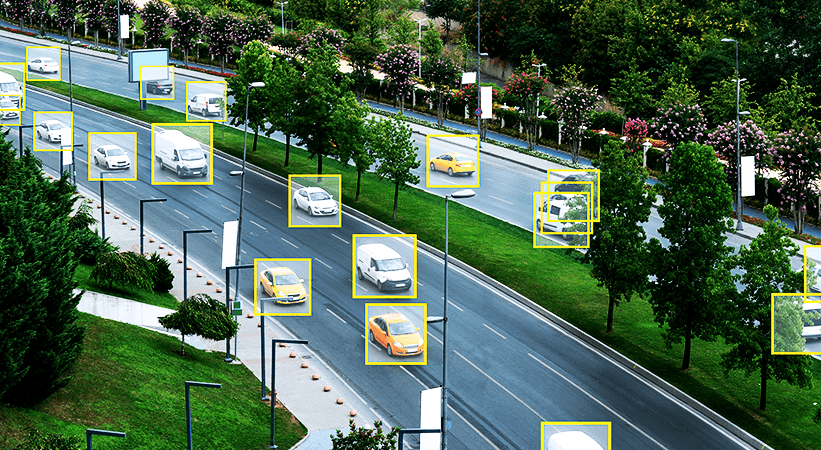
    • Process: Annotators describe the visual content using techniques like bounding boxes, polygons, and keypoint annotation.
    • Importance: High-quality annotations are crucial for creating accurate and reliable machine learning models.

    There are different annotation types depending on the information you want the model to learn from the data. Here are some common examples:

    • Bounding Boxes: Draws a box around an object in the image.
    • Image Classification: Assigns a category label to the entire image (e.g., cat, dog, car).
    • Semantic Segmentation: Labels every individual pixel in the image according to its category (e.g., sky, road, person).
  • Image annotation

    Image annotation

    Image annotation is the process of adding labels to images to help machines understand their content. This is a crucial step in training artificial intelligence (AI) and machine learning (ML) models, particularly in the field of computer vision. By providing this labeled data, you essentially teach the model what to look for in the image.

    Here’s a breakdown of key points about image annotation:

    • Purpose:
      • Train computer vision models to recognize objects, scenes, and activities in images.
      • Provide data for tasks like image retrieval, image classification, and object detection.
    • Process:
      • Humans typically perform image annotation using specialized software tools.
      • Different annotation tasks involve assigning labels, drawing bounding boxes around objects, or creating segmentation masks.
    • Types of annotation:
      • Image classification: Assigning a single category label to the entire image (e.g., cat, car, landscape).
      • Object detection: Drawing bounding boxes around objects in the image and labeling them (e.g., car, person, bicycle).
      • Semantic segmentation: Labeling every pixel in the image to identify which object it belongs to.
    • Applications:
      • Self-driving cars: Annotating images to train models to recognize traffic signs, pedestrians, and other objects on the road.
      • Medical imaging: Annotating X-rays and MRI scans to help doctors detect abnormalities.
      • Facial recognition: Labeling faces in images to train models for security applications or social media.

    Image annotation is a vital part of developing intelligent systems that can perceive and understand the visual world.

  • Introducing Material Symbols by Google

    Introducing Material Symbols by Google

    SOURCE: https://fonts.google.com/icons

    Material Symbols are a collection of icons designed by Google that follow the Material Design guidelines. They were introduced in April 2022 and are built on variable font technology, which allows for more flexibility and customization than traditional icon fonts.

    There are over 3,200 Material Symbols available, covering a wide range of topics and concepts. They are available in three styles: outlined, rounded, and sharp. You can also customize the weight, fill, optical size, and grade of the icons using variable fonts.

    Material Symbols are a great way to add icons to your web projects, mobile apps, and other digital products. They are easy to use and can be customized to match your brand identity. You can find the complete set of Material Symbols on Google Fonts: https://fonts.google.com/icons

  • What is Data Mining?

    What is Data Mining?

    Data mining is the process of sifting through large amounts of data to uncover hidden patterns, trends, and relationships. It’s like sifting through a pile of rocks to find gemstones. The data can be structured, semi-structured, or unstructured, and it can come from a variety of sources, like databases, social media, and even financial transactions.

    By using data mining techniques, businesses can gain a deeper understanding of their customers, identify new markets, and make more informed decisions. For example, a retail store might use data mining to see what products are frequently bought together, so they can stock their shelves accordingly. Or, a bank might use data mining to identify patterns of fraudulent activity.

    Data mining is a powerful tool, but it’s important to use it responsibly. There are ethical considerations around data privacy, and it’s important to make sure that data is being collected and used appropriately.

  • Data Annotation

    Data Annotation

    Data annotation is the groundwork for training machine learning models. It’s essentially the process of labeling data with tags or descriptions to make it understandable for algorithms. Think of it as teaching a child to identify objects by pointing them out and naming them.

    Here’s a breakdown of what data annotation involves:

    • Adding labels: This could be anything from identifying objects in an image to classifying sentiment in text data.
    • Providing context: Annotators might draw bounding boxes around objects in a video or transcribe speech into text.
    • Categorizing information: Data can be tagged with specific categories to help the machine learning model learn how to differentiate between different types of information.

    By providing this labeled data, data annotation helps machine learning models to effectively “learn” and improve their performance. Here are some of the common types of data that are annotated:

    • Images and Videos: Annotators might identify objects, track their movement, or transcribe speech.
    • Text: Data can be annotated for sentiment analysis, topic modeling, or to identify specific entities.
    • Audio: Similar to videos, audio can be annotated to transcribe speech or recognize specific sounds.

    Data annotation is a crucial step in developing many AI applications like self-driving cars, facial recognition systems, and chatbots. Overall, it’s the foundation for machines to understand and process information the way humans do.